
Crawling is a search engine bot discovering and downloading a page by following links or reading a sitemap — the first of three stages, before indexing and ranking, and a page that’s never crawled can’t reach the other two no matter how good its content is. Bots discover new pages primarily by following links from already-known pages, which is why orphan pages — pages with no internal links pointing to them — are frequently never crawled at all, even when they’re technically live and reachable by direct URL.
Key Takeaways
- Crawling is bot discovery — the first of three stages (crawling, indexing, ranking) — and a page never crawled can’t reach the later two.
- robots.txt blocks crawling; it does not remove an already-indexed page. Use noindex for that instead.
- Crawl budget is a real constraint mainly for large sites (Google cites roughly 1M+ pages, or 10K+ pages updated daily) — most small and mid-sized sites won’t hit it.
- Server log file analysis reveals real Googlebot behavior that Search Console’s sampled Crawl Stats report can miss.
- AI crawlers (GPTBot, ClaudeBot, PerplexityBot) are separate bots from Googlebot — a robots.txt rule written for Googlebot doesn’t automatically cover them. See AI bot user agents.
John Mueller has noted: “crawl-budget is over-rated. Most sites never need to worry about this.”
How Does Web Crawling Actually Work, Step by Step?
Web crawling works by a bot starting from a set of known URLs — from a sitemap, previous crawls, or external links — then following every link it finds on each page to discover new URLs, repeating this process continuously and prioritizing pages based on estimated importance and update frequency. This is a continuous, ongoing process, not a one-time event.
Google has confirmed that crawl prioritization considers factors including a site’s overall popularity, how often content changes, and the server’s response speed and reliability — meaning two sites with identical content can be crawled at meaningfully different rates depending on these underlying signals.
What’s the Difference Between Crawling, Indexing, and Ranking?
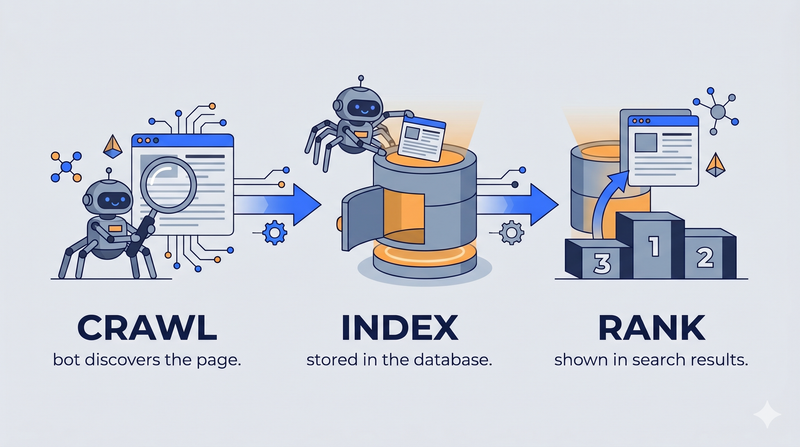
Crawling is discovery, indexing is storage in the search engine’s database, and ranking is the ordering of stored pages for a specific query — three distinct stages, each blocked or influenced by different mechanisms. A full breakdown of the indexing and ranking stages lives on indexing; this page focuses specifically on the crawling stage that precedes both.
Confusing these stages is a common diagnostic mistake: blocking a page in robots.txt prevents crawling but doesn’t guarantee it stays out of the index if external links point to it, while a noindex tag prevents indexing without preventing the crawl itself — the two directives solve genuinely different problems.
What Is Robots.txt and How Does It Control Crawling?
Robots.txt is a plain-text file at a site’s root domain that tells crawlers which parts of a site they’re allowed or disallowed from crawling, using simple directives that respectful bots (including Googlebot) check before crawling any page. It doesn’t hide a page from search results directly — it only prevents the crawl.
This distinction trips up a lot of people: blocking a URL in robots.txt does not remove it from Google’s index if that URL is already indexed or gets discovered through an external link, since Google can index a URL based on link context alone without ever crawling its content. Removing an already-indexed page requires a noindex tag instead, which requires the page to be crawlable in the first place.
What Is Crawl Budget and When Does It Actually Matter?
Crawl budget is the number of pages a search engine bot will crawl on a given site within a given timeframe, determined by a combination of crawl rate limit (how fast the server can handle requests) and crawl demand (how much the search engine wants to crawl based on the site’s popularity and freshness). Google has stated crawl budget is a meaningful concern primarily for large sites — generally cited as sites with over a million pages, or sites with frequent content changes at scale.
For most small and mid-sized sites, crawl budget is rarely the limiting factor in getting pages indexed — content quality, internal linking, and technical accessibility matter far more. Chasing crawl-budget optimization on a 200-page site is usually solving the wrong problem.
How Can You See Exactly What Googlebot Is Crawling on Your Site?
You can see exactly what Googlebot is crawling by analyzing server log files, which record every request made to your server — including crawler requests — revealing real crawl behavior that Search Console’s sampled reporting doesn’t fully capture. A basic log file review typically follows this sequence:
- Pull raw server logs (or CDN logs) covering at least a few weeks of activity.
- Filter requests to isolate known crawler user-agents (Googlebot, Bingbot, GPTBot, etc.), verifying by IP range rather than user-agent string alone, since user-agent strings can be spoofed.
- Group requests by URL pattern to spot where crawl activity is concentrated.
- Flag low-value URL patterns (parameter variations, duplicate pages, redirect chains) consuming a disproportionate share of crawl activity.
- Compare against pages that actually matter for rankings to confirm they’re being crawled at a healthy frequency.
This is distinct from the Crawl Stats report in Search Console. See log file analysis for a full walkthrough of this diagnostic process — crawl budget and crawl depth cover the related concepts this analysis is usually done to diagnose.
What Are the Most Common Crawling Problems?
The most common crawling problems are accidental robots.txt blocks, orphan pages with no internal links, crawl traps created by infinite URL parameter combinations, slow server response times that cause bots to reduce their crawl rate, and crawl budget genuinely exhausted on very large sites. Each has a distinct, targeted fix rather than a one-size-fits-all solution.
Common crawling problems and fixes:
- Blocked by robots.txt — symptom: page never indexed despite existing — fix: audit /robots.txt, remove the disallow rule
- Orphan pages — symptom: never discovered, no internal links — fix: add contextual internal links
- Crawl traps — symptom: bots waste budget on near-duplicate URLs — fix: canonicalize or block parameter URLs
- Slow server response — symptom: bots reduce crawl rate automatically — fix: improve server/page speed
- Crawl budget exhausted — symptom: important pages crawled rarely — fix: prune thin pages — see content pruning
How Do AI Crawlers Like GPTBot and ClaudeBot Differ From Googlebot?
AI crawlers used for training data and real-time retrieval — including GPTBot, ClaudeBot, and PerplexityBot — generally respect robots.txt directives the same way Googlebot does, but they’re separate bots with their own user-agent strings, meaning a robots.txt rule targeting Googlebot specifically won’t automatically apply to them. A site can be fully open to Google while unintentionally blocking or allowing AI crawlers differently, depending on how the rules are written.
Because these AI crawlers and their behavior are newer and evolving faster than the decades-established norms around Googlebot, it’s worth checking each operator’s current published documentation directly rather than assuming behavior stays constant. See AI bot user agents for the current known user-agent strings.
Frequently Asked Questions
What is the difference between a web crawler and a web scraper?
A crawler systematically discovers and downloads pages across a site or the web to build an index, typically respecting robots.txt and operating transparently, while a scraper extracts specific data from pages for a targeted purpose and doesn’t always respect crawling conventions or identify itself.
Does crawl budget matter for small websites, or mainly large ones?
Crawl budget mainly matters for large sites — generally those with over roughly a million pages or with rapidly changing content at scale, per Google’s own guidance. Small and mid-sized sites are far more likely to have an indexing or content problem than an actual crawl budget constraint, even when crawl-related symptoms appear.
What is the difference between a robots.txt disallow and a noindex tag?
A robots.txt disallow prevents a bot from crawling a URL at all, while a noindex tag allows crawling but instructs the search engine not to store the page in its index. Using robots.txt to try to remove an already-indexed page doesn’t work reliably, since the page can remain indexed based on external signals even without being crawled again.
What crawl error types actually show up in Google Search Console, and what do they mean?
Search Console’s Crawl Stats report categorizes errors including server errors (5xx), redirect errors, DNS errors, and “blocked by robots.txt” — each pointing to a different layer of failure, from server infrastructure issues to intentional or accidental crawl directives.
How often does Google recrawl an existing website?
Recrawl frequency varies significantly by site based on crawl demand signals like update frequency and popularity — Google has stated more popular and more frequently updated pages tend to be recrawled more often, with no fixed universal schedule applying to all sites equally.
Can I request that Google crawl a specific page right now?
Yes — the URL Inspection tool in Search Console includes a “Request Indexing” option that prompts a priority crawl of a specific URL, though Google has noted this doesn’t guarantee immediate crawling or indexing, particularly during periods of high overall crawl demand across the web.
Does having more backlinks increase how often Googlebot visits my site?
Backlinks are one of the signals contributing to crawl demand, since pages with more external references are treated as more likely to have valuable, worth-recrawling content — though backlinks alone don’t override server capacity constraints reflected in the crawl rate limit side of the crawl budget equation.
Where can I see historical crawl stats for my own site?
The Crawl Stats report in Google Search Console (under Settings) shows crawl request trends over roughly the past 90 days, broken down by response code, file type, and crawl purpose, giving a historical view distinct from real-time server log analysis.
Does a brand-new website start with a smaller crawl budget than an established one?
New sites generally start with lower crawl demand simply because they haven’t yet built the popularity, update-frequency history, or backlink profile that increases crawl priority — this typically improves organically as the site accumulates those signals over time rather than requiring a specific technical fix.
What happens if Googlebot repeatedly hits a server error (5xx) on my site?
Repeated server errors cause Google to reduce its crawl rate automatically to avoid overloading a struggling server, which can compound the original problem by slowing recovery of crawl frequency even after the server issue is fixed, since crawl rate reduction doesn’t reverse instantly.
Is there a way to tell Google which pages to crawl first?
XML sitemaps can include priority and last-modified hints, and internal linking structure signals relative importance, but Google has been explicit that these are hints influencing crawl prioritization rather than directives Google is obligated to follow exactly.
Do CDNs or aggressive caching change how bots crawl a site?
A well-configured CDN generally improves crawl efficiency by serving pages faster, which can positively influence crawl rate limit; overly aggressive caching that serves stale content to crawlers, however, can cause search engines to index outdated versions of frequently updated pages.


