Googlebot is Google's web crawler — the automated program that discovers, fetches, and renders your pages so Google can index and rank them. It isn't one bot but a family, led by a mobile-first Smartphone crawler.
Most people picture a single robot reading the web. The reality is stranger: Google runs more than fifteen crawlers, and the one doing most of the work pretends to be a phone.
What is Googlebot?
Googlebot is the software Google uses to crawl the web. It finds URLs, fetches the HTML, renders the page, and hands the result to Google's indexing systems. (That discovery step is crawling; the storage step is indexing.)
It discovers new URLs mainly by following links on pages it has already crawled — which is why a page with no links pointing to it can stay invisible no matter how good it is. Submitting an XML sitemap helps, but links do the heavy lifting.
Googlebot Smartphone vs Googlebot Desktop
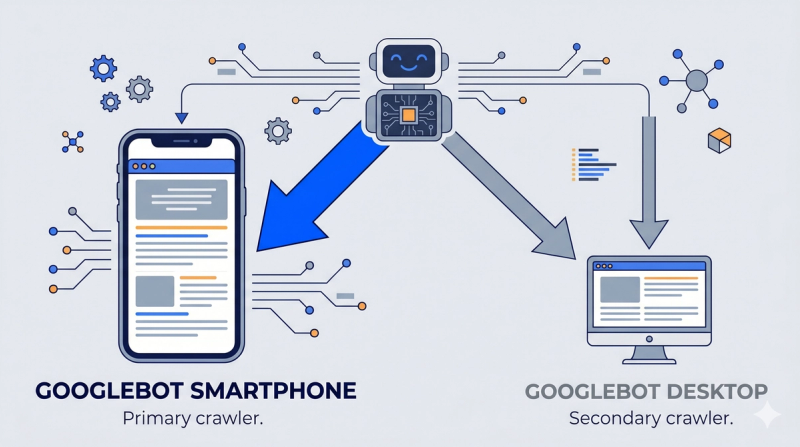
Google runs two main web crawlers:
- Googlebot Smartphone — behaves like a mobile browser. Under mobile-first indexing, completed for all sites by late 2023, this one does the majority of crawling.
- Googlebot Desktop — now a minority crawler, used mainly to fill gaps.
The catch most guides miss: they share a single robots.txt product token. You can allow or block "Googlebot," but you cannot allow one subtype and block the other. To see which one actually hit a URL, read the user-agent string in your server logs.
Why this matters in practice: your mobile version is the version Google usually indexes. Strip content or internal links out of your mobile build and you strip them out of Google's understanding of the page — even if most of your visitors are on desktop.
How Googlebot renders pages
Modern Googlebot doesn't just read raw HTML. It renders the page in a headless Chromium browser — running CSS and JavaScript — to see what a user sees. Since 2019 that renderer is "evergreen," staying current with the latest stable Chrome, so it supports modern JavaScript features.
One hard limit worth knowing: Googlebot reads roughly the first 15 MB of an HTML file (and the first 64 MB of a PDF). Push critical content or links past that line on a bloated page and Googlebot may never see them.
The full Googlebot family: 15+ crawlers
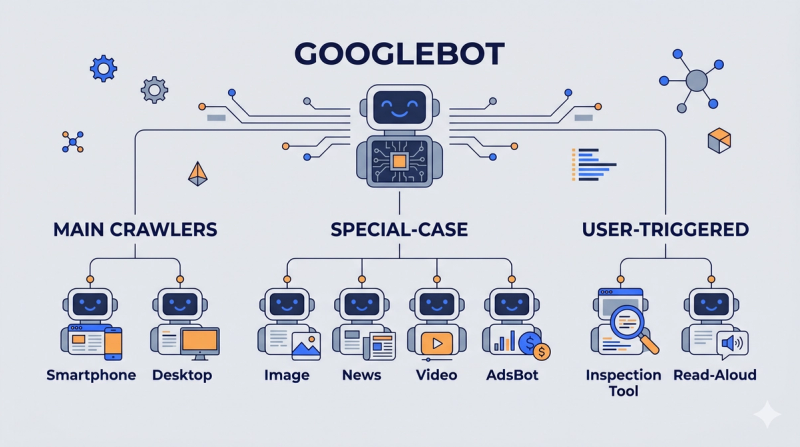
Google documents more than fifteen crawlers, in three groups:
- Googlebot (the main crawler) — Smartphone and Desktop. Always obeys robots.txt.
- Special-case crawlers — tied to specific products: Googlebot Image, Googlebot News, Googlebot Video, AdsBot (checks ad landing-page quality), Mediapartners (AdSense). Some of these don't fully follow site-wide robots.txt rules.
- User-triggered fetchers — fired by a user action rather than scheduled crawling: Google-InspectionTool (powers Search Console's URL Inspection and the Rich Results Test), Google-Read-Aloud, and others.
Two you'll increasingly spot in logs: GoogleOther (launched April 2023 for research and development crawls, to take load off the main Googlebot) and Google-InspectionTool. Accidentally blocking Google-InspectionTool is a quiet way to break your own Search Console diagnostics — your tools start failing and the cause isn't obvious.
How to verify it's really Googlebot
The user-agent string can be faked. Spammers and scrapers routinely wear Googlebot's name to slip past defenses, so the label alone proves nothing.
Google's own guidance: verify by reverse DNS lookup on the request's IP — it should resolve to a googlebot.com or google.com hostname — or match the IP against Google's published crawler IP ranges. This matters most when "Googlebot" traffic is hammering your server and you're deciding whether to block it. Half the time, it isn't Google.
How to see Googlebot activity
- Google Search Console → Crawl Stats — requests over time, broken down by response code and by Googlebot type.
- Server logs — the ground truth: every real request, with user-agent, URL, status code, and timestamp. The only way to see exactly where your crawl budget goes.
- URL Inspection Tool — the last crawl date and rendered view for a single URL.
Googlebot and AI search
Google's AI Overviews and AI Mode don't run a separate crawler or a separate index. They draw on the content Googlebot already crawled and indexed.
So Googlebot access is the entry ticket for AI visibility too. If it can't crawl and render your page, generative results won't consider it — your GEO work has nothing to stand on until the fundamentals are in place.
Frequently asked questions
Is Googlebot one crawler or many?
Many. "Googlebot" is the main crawler (Smartphone plus Desktop), but Google runs 15+ crawlers in total, including Image, News, Video, AdsBot, and user-triggered fetchers like Google-InspectionTool.
Does Googlebot use mobile or desktop?
Mostly mobile. Under mobile-first indexing, Googlebot Smartphone does the majority of crawling, and your mobile version is what usually gets indexed. You can't separate the two crawlers in robots.txt.
How do I know if real Googlebot is crawling my site?
Don't trust the user-agent — it's easily spoofed. Verify with a reverse DNS lookup on the IP, or match it against Google's published Googlebot IP ranges.
Can I block Googlebot?
Yes, through robots.txt — but that stops the page from being crawled at all, which is rarely what you want for content you'd like found. To keep a page out of results, use noindex instead, and make sure robots.txt still allows the crawl so Google can read that tag.
How often does Googlebot crawl my site?
It depends on crawl budget, how often your pages change, your server speed, and page authority. Most sites are visited every few seconds at most; a new page with no internal links might wait weeks.


