
A SERP is the page a search engine shows after someone runs a query — organic results, paid ads, and any combination of additional features like an AI Overview or a local pack, depending on what that specific search calls for. In SEO and digital marketing, “SERP” almost always means this Google/Bing results page — not the unrelated finance term Supplemental Executive Retirement Plan that shares the same acronym.
Key Takeaways
- SERP stands for Search Engine Results Page — in SEO context, not the unrelated finance term (Supplemental Executive Retirement Plan) that dominates the bare-keyword search.
- A modern SERP can include organic results, ads, an AI Overview, a featured snippet, PAA, a local pack, and a knowledge panel — rarely all at once.
- SERP position is a snapshot for one search at one moment; “ranking” describes performance across time. The two get used interchangeably but aren’t quite the same thing.
- Google personalizes SERPs by location, device, and search history — two people searching the same term can legitimately see different results.
- AI Overviews are compressing visible organic space, making citation inside the AI Overview itself an increasingly important parallel goal to traditional ranking.
What Features Can Appear on a SERP?
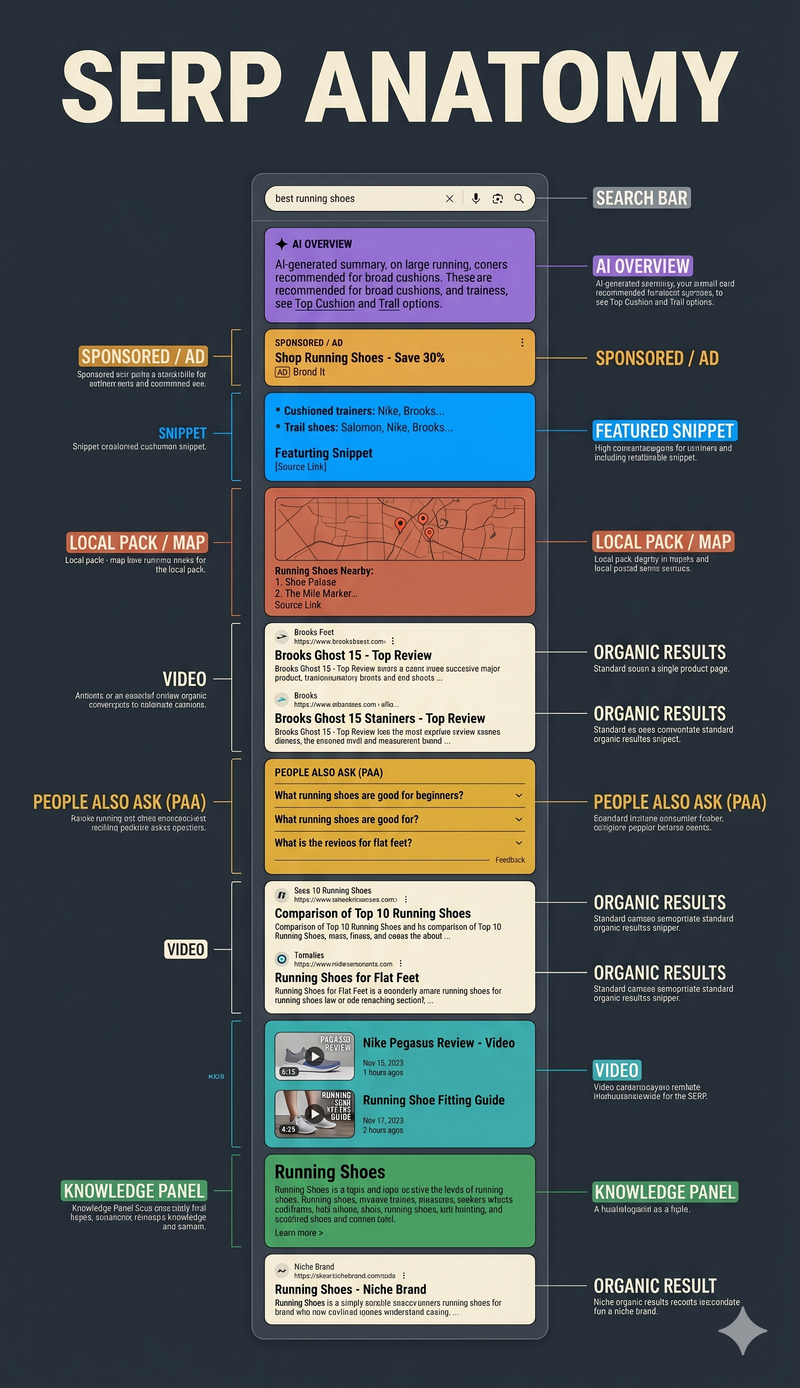
A modern SERP can include organic results, paid ads, an AI Overview, a featured snippet, a People Also Ask box, a local pack, a knowledge panel, and image or video carousels — with the exact combination varying by query intent and how many of these features Google decides to surface for that specific search. No single search shows all of them at once.
SERP features:
- Organic results — standard ranked listings — triggers on almost all queries
- AI Overview — AI-generated synthesized answer — triggers on informational queries — see: AI Overviews
- Featured snippet — boxed direct answer from a ranking page — triggers on “how to,” “what is” queries — see: featured snippet
- People Also Ask — expandable related questions — triggers on most informational queries — see: People Also Ask
- Local pack — map + local business results — triggers on local-intent queries — see: local pack
- Knowledge panel — entity info box — triggers on branded/entity queries — see: knowledge graph
How Are Organic Results Different From Paid Results on a SERP?
Organic results are ranked algorithmically based on relevance and authority signals with no payment involved, while paid results are advertisements a business pays to display, typically marked with a small “Sponsored” or “Ad” label and positioned above or alongside organic listings. The ranking mechanisms behind each are entirely separate systems.
This separation matters for strategy: SEO work influences only the organic portion of a SERP, while paid search (PPC) is a distinct discipline governed by bidding and ad quality scores. A business appearing in both the ad slot and the organic results for the same query occupies two separate SERP real-estate systems, not one doubled-up ranking.
How Is the AI Overview Changing What Appears on a SERP?
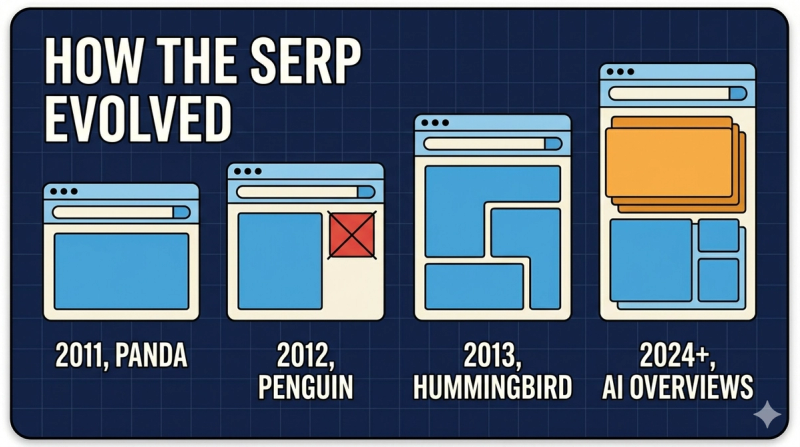
The AI Overview is compressing the visible space available to traditional organic results by inserting a synthesized, multi-source answer directly above them, which measurably reduces how many organic listings a searcher sees without scrolling. Google has described AI Overviews as drawing from multiple ranking web pages to construct a single generated summary, rather than pulling from just the top-ranked result the way a featured snippet does.
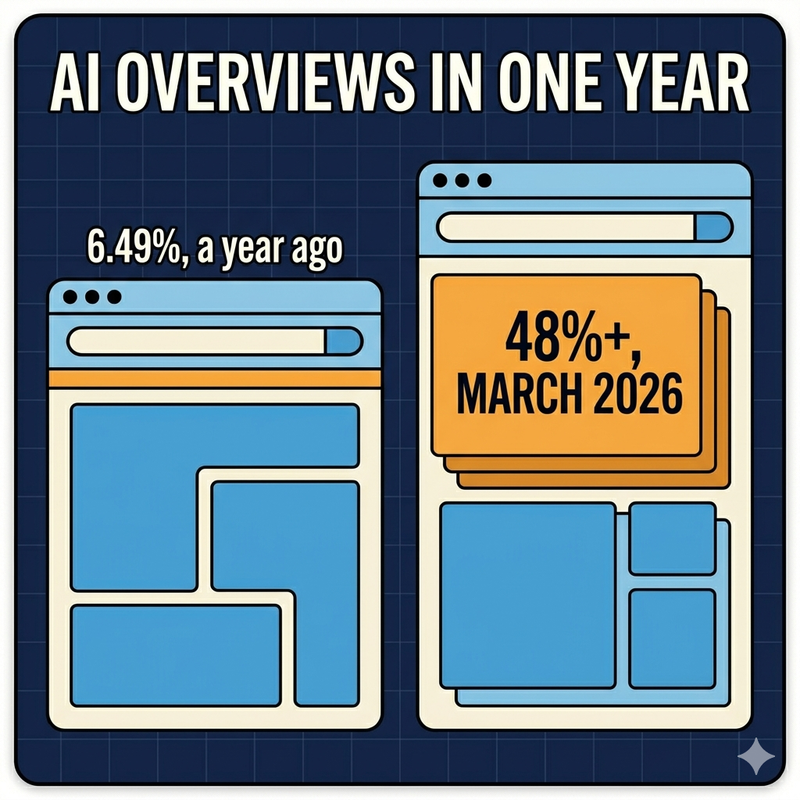
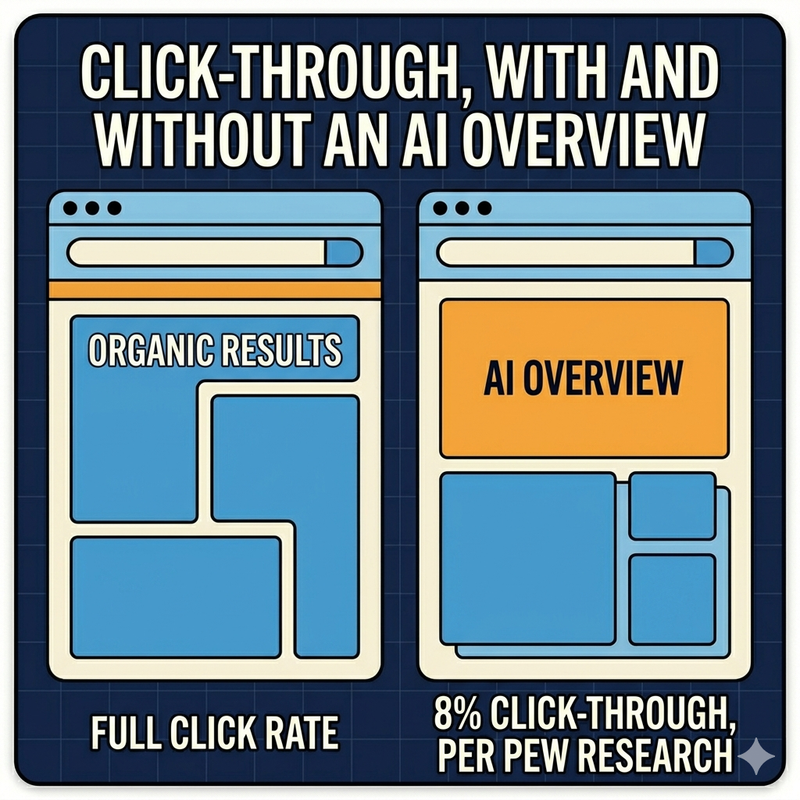
The practical shift for SEO is that ranking well organically no longer guarantees visibility the way it once did — a page can rank #1 organically and still be effectively pushed below the fold by an AI Overview citing several other sources instead. Google’s own official disclosure (February 2026) confirmed AI Overviews now appear on roughly 50% of US search queries, up from about 6.5% in January 2025 — a near 8x expansion in about a year. Multiple independent studies report organic CTR dropping somewhere in the 34–61% range on queries where an AI Overview appears.
What’s the Difference Between SERP and SEO?
SERP is the results page itself — the output a search engine generates — while SEO is the discipline of optimizing content and technical factors to influence position within that output. One is a noun describing a page; the other is a verb-like practice describing an activity aimed at that page.
The confusion between the two terms usually comes from casual industry shorthand, where “SERP” gets used loosely to mean “search rankings” in general conversation. Precisely, though, a business doesn’t “do SERP” — it does SEO in order to achieve a better position on the SERP.
How Do You Track SERP Rankings?
SERP rankings are tracked using rank-tracking software that periodically queries a search engine for target keywords and records a domain’s position, since Google Search Console reports average position but not the daily, competitor-inclusive tracking most SEO teams need. A basic rank-tracking setup typically involves:
- Choosing a rank-tracking tool that simulates real, logged-out searches at scale rather than relying on personalized results.
- Defining the target keyword list, including both head terms and the long-tail variants actually driving impressions.
- Setting the correct location and device targeting to match the audience that actually matters for the business.
- Reviewing position trends over time rather than reacting to single-day fluctuations, since day-to-day noise is normal.
- Cross-referencing rank tracker data against Search Console’s own position data periodically, since the two won’t match exactly but shouldn’t diverge wildly either.
Rank tracking data is inherently a sample, not a perfect record — actual positions vary by location, device, personalization, and even time of day.
Why Does My SERP Look Different From Someone Else’s for the Same Search?
Google personalizes SERPs based on the searcher’s location, device type, search history, and language settings, meaning two people searching the identical term at the identical moment can see meaningfully different results, especially for local or ambiguous queries. This personalization is deliberate, not a bug or inconsistency in Google’s ranking system.
This is a common source of confusion in client reporting: a business owner searching their own company name from their office computer often sees a more favorable SERP than an actual customer would, purely due to personalization and search history — which is exactly why rank-tracking tools deliberately simulate logged-out, unpersonalized searches rather than relying on manual spot-checks.
What Is a SERP Example for Different Query Types?
SERP composition varies predictably by query intent — informational queries tend to surface an AI Overview and PAA box, navigational queries show minimal features beyond the target site, commercial queries show ads plus comparison-style organic content, and local queries surface a map-based local pack. Recognizing which pattern a target keyword falls into helps set realistic expectations for what “ranking well” actually looks like for that term.
Query type → typical SERP features:
- Informational (“what is a title tag”) — AI Overview, PAA, organic
- Navigational (“facebook login”) — organic (often 1–2 results), sitelinks
- Commercial (“best domain authority checker”) — ads, organic, comparison content
- Local (“coffee shop near me”) — local pack, map, organic
- Transactional (“buy iphone 17”) — shopping results, ads, organic
Frequently Asked Questions
What is a “zero-click” SERP result, and how common are they now?
A zero-click result is a search that gets fully answered by a SERP feature — a featured snippet, AI Overview, or knowledge panel — without the searcher clicking through to any website. Industry click-tracking studies have shown zero-click searches making up a substantial and growing share of all Google searches as AI Overviews and other on-SERP answers have expanded.
How many organic results actually appear on a typical SERP today?
Google traditionally displayed around 10 organic results per page, but the actual visible count on a modern SERP is often lower once ads, AI Overviews, PAA boxes, and other features are accounted for — some competitive commercial SERPs now show only a handful of true organic listings above the fold.
What is SERP volatility, and why do rank trackers report it daily?
SERP volatility measures how much search rankings are fluctuating across a broad set of tracked keywords, used as an early signal of a Google algorithm update even before Google confirms one. Rank-tracking tools report it daily because volatility spikes often precede official update announcements by days.
Should local businesses care about the local pack even when they also rank organically?
Yes — the local pack occupies prominent, often above-the-fold space for local-intent searches, and many searchers interact with the map pack without scrolling to organic results at all, making local pack presence a largely separate visibility channel from organic ranking for location-based queries.
Is a SERP the same thing as a search engine?
No — a search engine is the overall system (Google, Bing) that processes queries and generates results; a SERP is the specific output page generated for one individual search. The search engine produces many different SERPs, one per unique query.
How is SERP CTR calculated, and why does it vary so much by position?
SERP click-through rate is calculated as clicks divided by impressions for a given position, and it varies sharply by position because searcher attention concentrates heavily on the first few results — industry CTR studies consistently show position one capturing a disproportionately larger share of clicks than position two, with the drop-off continuing steeply through the rest of page one.
What is “SERP position,” and how is it different from “ranking”?
SERP position is the specific numbered spot a page occupies for one search at one moment, while “ranking” is often used more loosely to describe overall visibility performance for a keyword across time and variation. Position is a snapshot; ranking performance is the trend.
Can two different websites hold the same position on a SERP at the same time?
No — for standard organic results, each position is occupied by exactly one URL at a time, though the same domain can occupy multiple positions if Google displays more than one page from that site (a phenomenon sometimes called site-links or a “double listing”).
What is a “universal” or “blended” SERP?
A universal or blended SERP is one that mixes multiple result types — text, images, video, local — into a single unified results page, a format Google adopted broadly starting around 2007 as a shift away from purely text-based results pages.
Why do some SERPs — like calculator or weather queries — show no organic results at all?
Certain query types trigger a direct, self-contained Google feature (a calculator widget, weather module, unit converter) that fully answers the query without needing to surface any external website, because Google determines the fastest, most complete answer doesn’t require sending the user anywhere else.
How are rich results different from a standard organic listing?
Rich results are standard organic listings enhanced with additional visual elements — star ratings, prices, recipe times — pulled from structured data markup on the source page, making that specific listing visually stand out from plain blue-link results at the same position.
Do voice search answers pull from the same SERP data as typed search?
Voice assistants typically pull from the same underlying ranking and featured-snippet data Google uses for typed search, often reading aloud the content of a featured snippet or a top-ranked answer, meaning strong featured-snippet performance for a query tends to correlate with strong voice-answer eligibility for the same query.
Why do two searches for the same term, minutes apart, sometimes show a different SERP layout?
Google continuously tests and updates ranking and layout in real time, meaning SERP composition can shift within minutes even without a major algorithm update — this is distinct from personalization, since it can happen even for identical, unpersonalized search conditions due to ongoing live experimentation.


