
In short: JavaScript SEO is the set of practices ensuring content that’s rendered by JavaScript — not present in a page’s raw HTML — can still be crawled and indexed correctly.
Key Takeaways
- Google does render JavaScript before indexing, using an evergreen Chromium engine — but rendering happens in a separate, delayed second wave after the initial crawl.
- Client-side rendering (CSR) is the source of most JavaScript SEO problems; server-side rendering (SSR) and static generation remove the rendering-queue dependency entirely.
- The URL Inspection tool in Search Console is the most reliable way to check what Google’s rendering pass actually captured — more reliable than a local browser test.
- AI crawlers (GPTBot, ClaudeBot) have historically had more limited JavaScript rendering than Googlebot — content passing fine for Google isn’t automatically visible to AI answer engines.
- Render budget is a distinct constraint from crawl budget — a page can be crawled promptly and still fail to index correctly if its JavaScript execution is too resource-heavy.
What Does JavaScript SEO Actually Mean?
More specifically, it exists because many modern websites — built on React, Vue, or Angular — generate large portions of visible content client-side, after the initial HTML loads, creating a gap between what a bot first receives and what a real visitor eventually sees.
The core problem JavaScript SEO addresses is a timing and processing gap. A search engine bot first receives raw HTML, and only afterward, in a separate rendering step, executes JavaScript to see the fully built-out page, the way a browser would. If that rendering step fails, times out, or is skipped, the search engine may index a page that looks empty or incomplete compared to what a human visitor sees.
Does Google Actually Render JavaScript Before Indexing?
Yes — Google renders JavaScript using an evergreen version of Chromium as part of its indexing pipeline, processing JavaScript much like a modern browser rather than treating a page as static HTML. Google has confirmed this rendering step publicly in its own developer documentation on JavaScript SEO basics.
The catch is that rendering happens in a second wave, separate from the initial crawl. Google has acknowledged this rendering queue can introduce delay, meaning JavaScript-dependent content sometimes gets indexed later than static HTML content on the same site. For time-sensitive content, that delay can be the difference between appearing in a fast-moving SERP and missing the window entirely.
What’s the Difference Between Client-Side and Server-Side Rendering for SEO?
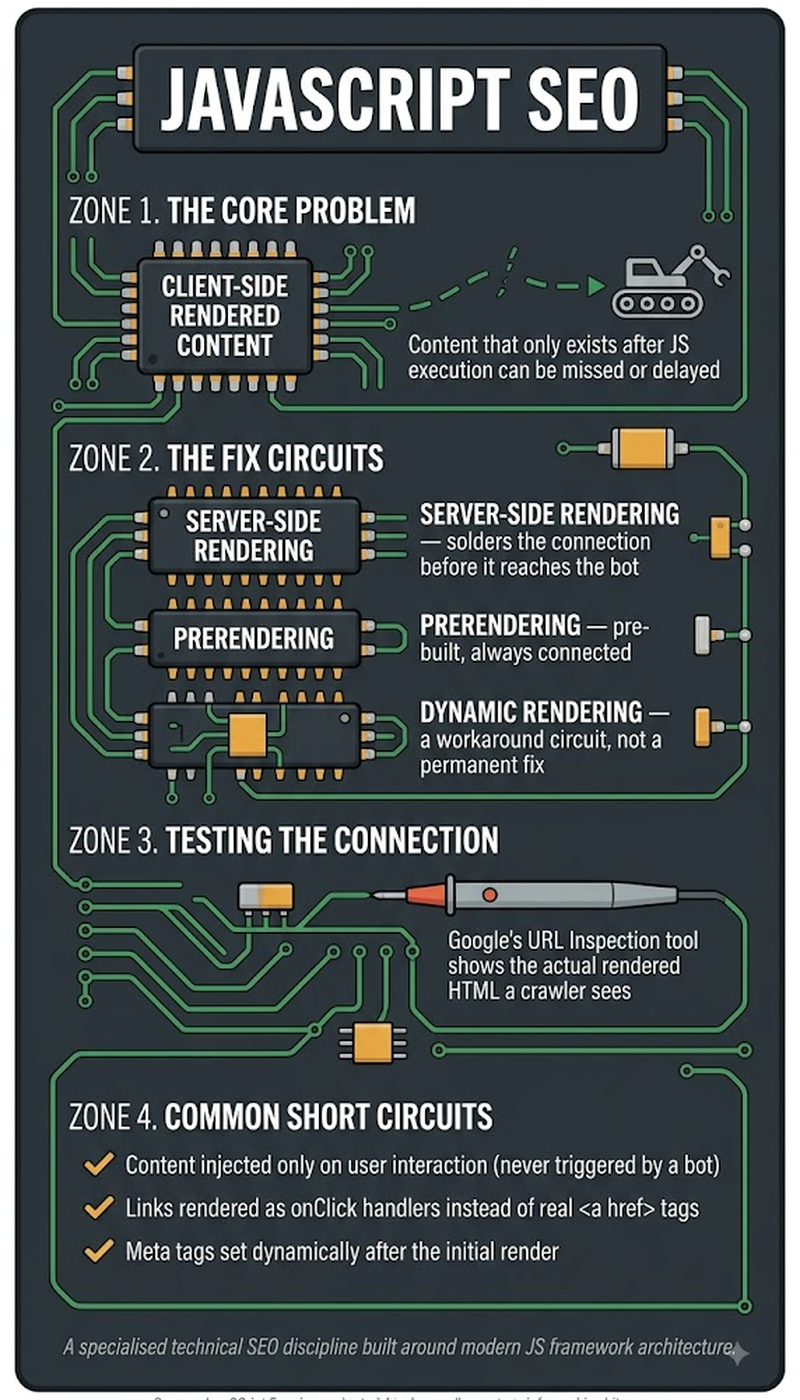
Client-side rendering (CSR) sends a mostly empty HTML shell to the browser and builds content in the browser via JavaScript. Server-side rendering (SSR) builds the full HTML on the server before sending it, so a crawler receives complete content immediately, without needing to execute JavaScript first. SSR removes the rendering-queue dependency entirely for the initial crawl.
Most JavaScript SEO problems trace back to CSR-only implementations, since a bot’s first HTML fetch reveals essentially nothing useful before rendering occurs. SSR, static site generation (SSG), and hybrid approaches like Next.js’s incremental static regeneration all exist specifically to solve this — delivering pre-built HTML rather than relying on pure client-side rendering.
What Are the Most Common JavaScript SEO Problems?
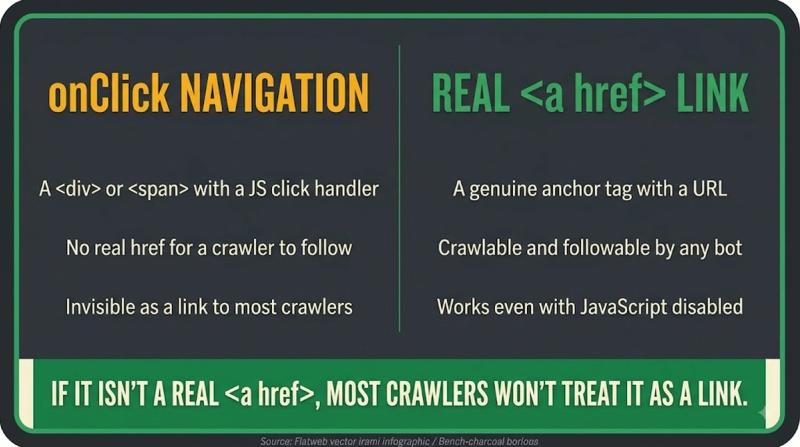
The most common JavaScript SEO problems fall into three categories: content that never renders due to a JavaScript error, internal links built with JavaScript event handlers instead of standard <a href> tags (which crawlers may not follow), and critical content loaded only after a user interaction, like a click or scroll, that a crawler never performs. Each can make legitimate content effectively invisible to search engines despite looking normal to a human visitor.
A more subtle problem is inconsistent rendering: content that renders correctly in a live browser test, but fails intermittently during Google's actual rendering pass, due to timeouts, blocked resources, or third-party script failures. A page can pass a manual "does it look right" check while still having real indexing problems at scale.
How Do You Check If Google Can See Your JavaScript Content?
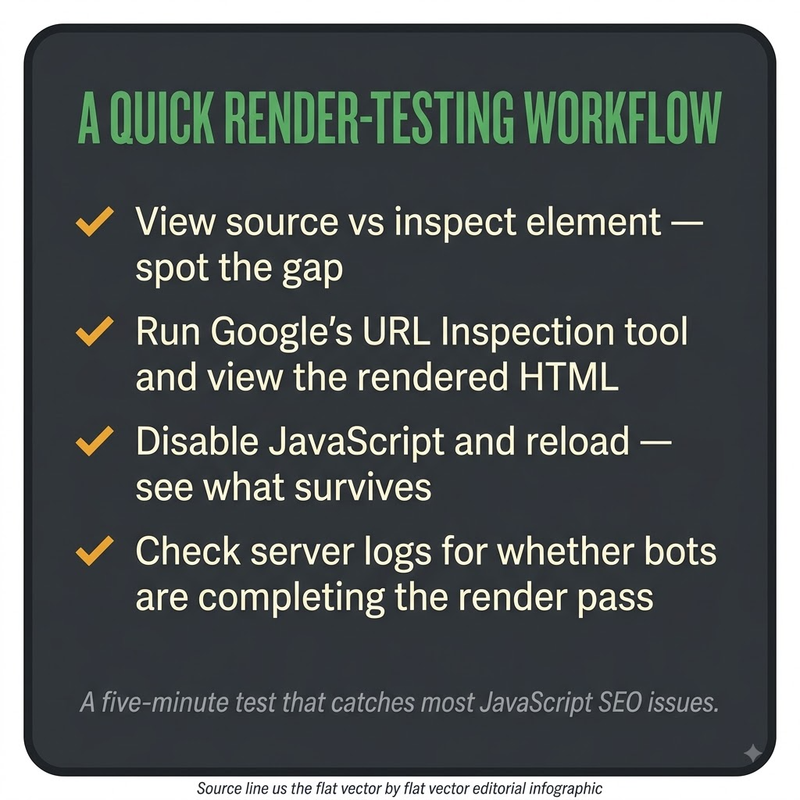
You check whether Google can see JavaScript-rendered content using the URL Inspection tool in Google Search Console, which shows the actual rendered HTML from Google’s own rendering pass. The check typically runs:
- Open URL Inspection and paste in the target page’s exact URL.
- Review the “rendered HTML” and screenshot Google generated during its own rendering pass.
- Compare that against what a real browser shows for the same URL, looking specifically for missing content, links, or key text.
- Separately compare the page's raw "View Source" HTML against its rendered DOM (via browser developer tools). A large gap between the two signals heavy JavaScript dependency, worth verifying directly rather than assuming is fine.
- Re-check after any major framework, hosting, or third-party script change, since rendering behavior can shift without a visible front-end change.
Check method comparison:
- URL Inspection (Search Console) — shows Google’s own rendered HTML + screenshot — reflects Google’s actual behavior: Yes
- Browser “View Source” vs. rendered DOM — shows gap between raw and executed HTML — reflects Google’s actual behavior: No (reflects the browser, not Googlebot)
- Manual browser test — shows how the page looks to a human visitor — reflects Google’s actual behavior: No (doesn’t reflect crawler constraints)
Do AI Crawlers Handle JavaScript the Same Way Google Does?
Most AI crawlers used for training data and real-time retrieval, including GPTBot and ClaudeBot, have historically had more limited JavaScript rendering capability than Googlebot. Content depending entirely on client-side rendering carries a higher risk of being invisible to AI systems, even when successfully indexed by Google. This gap is one of the more consequential, under-discussed differences between traditional SEO and GEO technical requirements.
Rendering capability across AI crawlers changes frequently, as these systems update. The safest practical guidance is treating server-rendered or statically generated HTML as the baseline requirement for content meant to be both search-engine and AI-answer-engine visible. Don't assume a JavaScript-heavy implementation that satisfies Googlebot will also satisfy every other bot accessing the same page.
How Does Render Budget Affect Whether JavaScript Content Gets Indexed?
Render budget is the finite computing resources Google allocates to executing JavaScript across the web. It affects JavaScript SEO because a page taking too long to render, or depending on excessive third-party scripts, risks having its rendering attempt cut short before all content finishes loading. This is distinct from crawl budget, which governs how often a page gets visited at all.
A page can be crawled promptly and still suffer indexing problems purely because its JavaScript execution is inefficient or resource-heavy, independent of the site's overall crawl budget health. Reducing unnecessary third-party scripts, minimizing render-blocking resources, and keeping the critical content path lean isn't just a Core Web Vitals concern. It directly affects whether Google's rendering pass successfully captures a page's full content, within the resources allocated to that single render.
Frequently Asked Questions
Does lazy-loading images or content specifically hurt SEO, or only certain lazy-loading implementations?
Properly implemented lazy-loading (using the native loading="lazy" attribute or Google-recognized techniques) generally doesn't hurt SEO. But implementations that hide content entirely until a scroll or click event, without it being present in the initial rendered DOM, can prevent that content from being seen during Google's render pass.
Can infinite scroll pages be fully indexed by Google, or only the initially loaded content?
Google's rendering typically only captures content loaded within its render pass. Content requiring continuous scrolling beyond what loads automatically can be missed entirely. A common fix is providing a paginated fallback, with accessible URLs for each content chunk alongside the infinite-scroll experience.
Does a single-page application (SPA) need a different sitemap strategy than a traditional multi-page site?
Yes. An SPA needs each meaningfully distinct view or route to have its own crawlable, indexable URL included in the sitemap. A search engine needs discrete URLs to index separately, even when the application itself never technically performs a full page reload between views.
How much rendering delay is typical between Google crawling a JS page and it appearing indexed?
There's no fixed published figure — it varies by site and current crawl/render queue demand. Google has acknowledged the rendering step can introduce meaningful delay compared to static HTML. Sites with indexing-speed concerns should verify actual timing for their own pages directly via Search Console, rather than relying on a general industry estimate.
Can third-party scripts on a page interfere with Google’s rendering of the main content?
Yes. A slow-loading or failing third-party script (analytics, chat widgets, ad tags) can consume render budget or cause rendering timeouts that prevent the main content from being fully captured, even when the core page code itself is completely sound.
Does using a JavaScript framework automatically hurt Core Web Vitals scores?
Not automatically. A well-optimized JavaScript framework implementation can perform well on Core Web Vitals. But JavaScript-heavy sites are statistically more prone to performance issues, like slow Largest Contentful Paint or high Interaction to Next Paint, if not specifically optimized for it.
Is hydration itself an SEO risk?
Hydration, making server-rendered HTML interactive by attaching JavaScript after initial load, isn't inherently an SEO risk, since the content is already present in the initial HTML. But a slow or failing hydration process can create a poor user experience that indirectly affects engagement-related signals.
Can you mix server-side rendering for some pages and client-side rendering for others on the same site safely?
Yes. A hybrid rendering strategy is common and generally safe, as long as each individual page's rendering approach reliably delivers its full content to crawlers. The risk isn't mixing approaches — it's failing to verify each page type independently.
Does Google penalize a site for having a large, render-blocking JavaScript bundle, or only deprioritize it indirectly through speed signals?
There’s no direct “penalty” specifically for bundle size — the effect is indirect, through slower page speed and Core Web Vitals signals, and through increased risk of render-budget-related indexing failures on resource-constrained rendering attempts.
What tools besides Google Search Console can diagnose JavaScript rendering issues before publishing?
Browser developer tools (comparing View Source to the rendered DOM), dedicated rendering-testing tools, and crawling software with JavaScript rendering capability (like Screaming Frog's JavaScript rendering mode) can all diagnose rendering issues pre-publish. There's no need to wait for a live Search Console inspection.
Does the number of third-party scripts on a page have a measurable relationship to indexing delay, or only to page speed?
Excessive third-party scripts can affect both. They slow page speed directly, and they can also consume enough of Google's allocated render budget for a page to risk an incomplete or delayed render. That connects page speed and indexing health more directly than is often assumed.


