
Cumulative Layout Shift (CLS) is a Core Web Vitals metric. It measures how much visible page content unexpectedly shifts position while a page is loading — the kind of jump that happens when an image without reserved space suddenly loads and pushes the text a user was about to click on somewhere else entirely. It's scored, not measured in percent or time. The score comes from the size of shifting elements and how far they moved. Google introduced it to give site owners a standardized way to measure real-world experience quality — something raw page-speed numbers don't capture.
Key Takeaways
- CLS is one of Google's three Core Web Vitals metrics, alongside Largest Contentful Paint and Interaction to Next Paint.
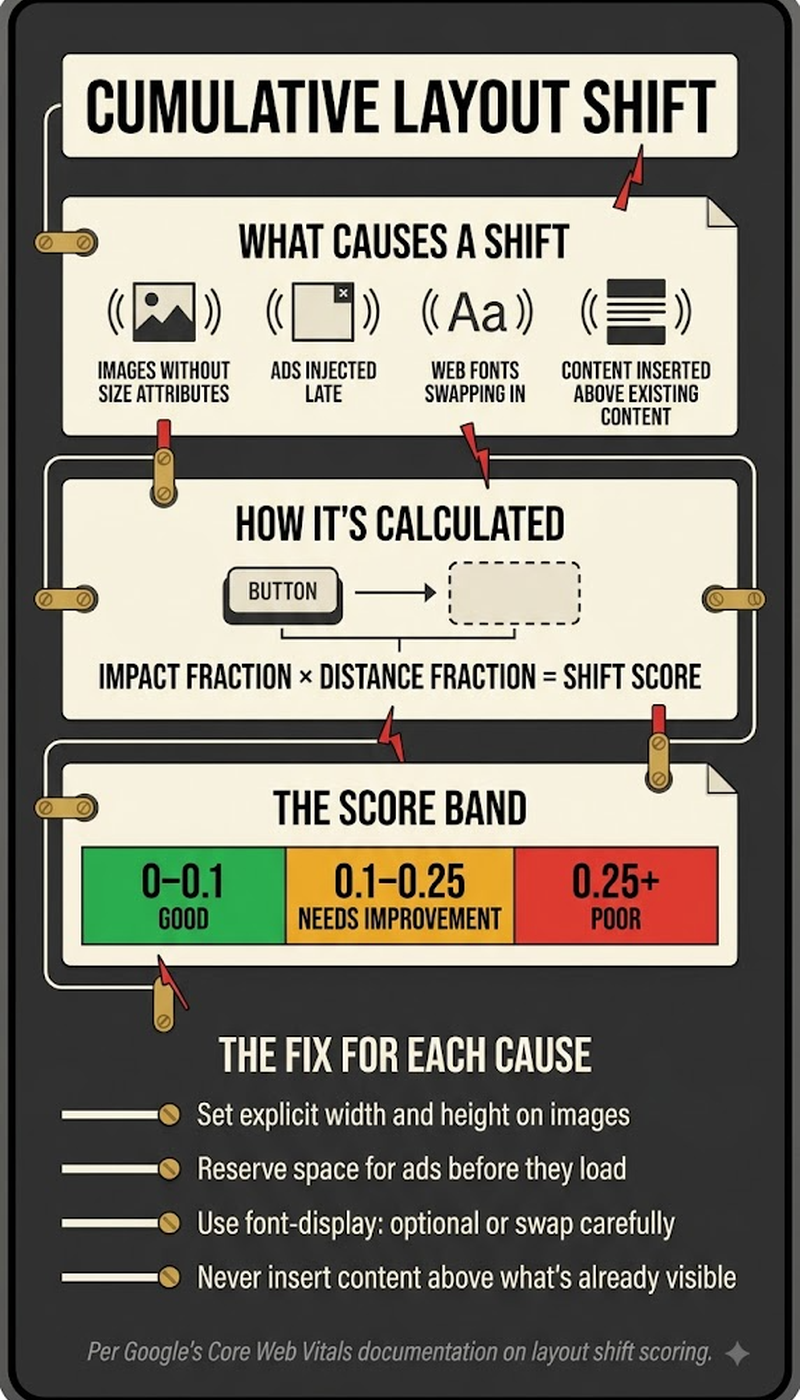
- A CLS score under 0.1 is generally considered good. 0.1–0.25 needs improvement, and above 0.25 is poor, per Google's own published thresholds. These bands have been adjusted over time, so verify current thresholds against Google's documentation before publishing.
- Common causes include images without dimension attributes, ads or embeds injected after initial load, and web fonts causing text to reflow (FOIT/FOUT).
- CLS affects user experience directly. As a Core Web Vitals component, it's also a factor Google has confirmed it uses within page experience ranking signals — though Google has clarified CWV alone is unlikely to cause a dramatic ranking swing.
- Fixing CLS is almost entirely a front-end technical task — setting explicit size attributes, reserving space for dynamic content, and being deliberate about how and when late-loading elements are injected.
What Causes Cumulative Layout Shift?
CLS is most commonly caused by a specific, recurring set of technical issues, each with its own straightforward fix:
- Images or videos without explicit width/height attributes — the browser doesn't know how much space to reserve, so content jumps once the media finishes loading. Fix: always set explicit dimensions or use an aspect-ratio CSS property.
- Ads, embeds, or iframes injected after initial page load — content shifts to make room once these late-arriving elements render. Fix: reserve space for known ad slot sizes in advance.
- Web fonts causing text reflow (FOIT/FOUT) — text rendered in a fallback font gets swapped for the custom font once it loads, shifting layout if the two fonts have different character widths. Fix: use font-display: optional or preload critical fonts.
- Dynamically injected content above existing content — a banner, cookie notice, or promotional element inserted above the fold pushes everything below it down. Fix: reserve layout space for these elements from the start rather than injecting them into a layout that assumes they don't exist.
- Animations that use layout-triggering CSS properties rather than transform, which can cause unintended shifts during the animation itself.
Largest Contentful Paint often degrades for the same reasons: a late-loading hero image or a web font swap delays both metrics at once, which is why fixing one frequently improves the other.
How Do You Measure a Page's CLS Score?
CLS can be measured using both real-user "field data" and simulated "lab data." The two often show different results, since real user devices, connection speeds, and interaction timing vary from a controlled lab environment. The methodology matters more than most guides mention. Google evaluates every Core Web Vitals metric, including CLS, at the 75th percentile of real Chrome user sessions over a rolling 28-day window. That means a page only earns a "Good" status once at least 75% of its real visits over that period hit the good threshold — not based on any single test or average.
- Field data, sourced from Google's Chrome User Experience Report (CrUX), reflects real visitors' actual experience and is what Google uses for Core Web Vitals ranking assessment, aggregated at the 75th percentile over 28 days.
- Lab data, from tools like Lighthouse or PageSpeed Insights, simulates a controlled test run. It's useful for debugging specific issues before they reach real users, but it doesn't always match field data exactly, since it reflects one test run rather than a percentile across real traffic.
- Google Search Console's Core Web Vitals report aggregates field data across a site's pages, grouped by status (good, needs improvement, poor). That makes it the most practical starting point for a site-wide CLS audit.
- PageSpeed Insights and Lighthouse both show which specific elements are contributing to layout shift on a given page. That's essential for actually diagnosing and fixing the issue, not just knowing the score is poor.
As of 2026 CrUX data, roughly 80.9% of origins pass CLS specifically. But only about 55.7–55.9% of origins pass all three Core Web Vitals simultaneously. That's a reminder: CLS being the easiest of the three to pass doesn't mean the overall page experience assessment is easy to pass.
Does Cumulative Layout Shift Directly Affect Search Rankings?
CLS, as one component of Core Web Vitals, is confirmed by Google to be part of its page experience signals used in ranking. But Google has also been explicit that Core Web Vitals alone are unlikely to cause a dramatic ranking change. Strong content and relevance still matter far more than perfect Core Web Vitals scores.
- Google's own guidance frames Core Web Vitals as a tiebreaker-style signal among pages that are otherwise similarly relevant, not a factor capable of overriding a large relevance or content-quality gap.
- Poor CLS more directly and reliably hurts conversion and engagement metrics (users abandoning a page after an accidental misclick caused by a layout shift) than it directly tanks rankings on its own.
- Fixing CLS is worth doing for genuine user experience reasons, independent of the ranking-signal debate. A page that visually jumps around while loading is a bad experience, regardless of what Google's algorithm does with that signal.
- Worth noting for context: Interaction to Next Paint (INP) replaced First Input Delay (FID) as the third Core Web Vital in March 2024 — any source still listing FID as a current Core Web Vital is outdated. CLS's own thresholds have not changed since they were established. Google's documentation has floated an aspirational future tightening to 0.05 or lower, once the ecosystem better handles third-party embed shifts — though there's no announced timeline.
Frequently Asked Questions
Can a single, one-time layout shift disqualify an otherwise good CLS score?
No — CLS is cumulative. It sums the impact of every unexpected shift during a page's lifecycle, rather than being disqualified by a single event. A page can have one small shift and still land comfortably in the "good" range overall.
Does CLS only apply to shifts that happen during initial page load, or also shifts caused by user interaction?
CLS specifically excludes shifts that occur within 500 milliseconds of a genuine user interaction, like a button click that intentionally reveals new content. The metric is designed to capture unexpected shifts, not layout changes a user directly caused on purpose.
Can single-page applications (SPAs) have unusually high CLS scores compared to traditional multi-page sites?
SPAs can be more prone to CLS issues if route transitions or dynamically loaded content aren't handled carefully. Content is frequently swapped in and out of the same page without a full reload, which creates more opportunities for unreserved space to cause shifts.
Does a slow internet connection make CLS worse for a given user?
Yes — slower connections often mean images, fonts, and embedded content load and render at more staggered, unpredictable times. That can increase the likelihood and visibility of layout shifts, compared to a fast connection where elements load close together.
Can browser extensions or ad blockers affect a real user's measured CLS?
Yes — ad blockers in particular can prevent ad-related layout shifts from occurring for that specific user. That means field data CLS scores can vary meaningfully across users, depending on what extensions they're running. It's part of why field data is aggregated across many real sessions, rather than relying on a single measurement.
Is there a way to test CLS before a page goes live, rather than only after?
Yes — Lighthouse (available in Chrome DevTools) and PageSpeed Insights both provide lab-based CLS testing on any URL, including staging environments. That lets a team catch layout shift issues before real users ever encounter them.
Does CLS apply separately to mobile and desktop versions of a page?
Yes — CLS is measured and reported separately for mobile and desktop. Layout, viewport size, and how elements render can differ significantly between the two, so a page can have very different CLS scores on each.
Can lazy-loaded images cause CLS even when implemented correctly?
Yes, if the reserved space for the lazy-loaded image doesn't match its actual final dimensions. Even a technically correct lazy-loading implementation can still cause a shift, if the placeholder space and the loaded image size don't match precisely.
How quickly does fixing CLS issues show up in Google's reported Core Web Vitals data?
Google's Core Web Vitals field data is based on a rolling window of real user data, commonly reported as a 28-day rolling average. Because of that, fixes typically take several weeks to fully reflect in Search Console's reported scores — even though the underlying fix takes effect immediately for new visitors.
Does CLS matter for pages with very little visual content, like a simple text article?
Yes, though the risk is generally lower. Even a simple text page can have CLS issues, from a late-loading web font causing text reflow to a top banner or cookie notice injected after initial render. Simplicity reduces the risk but doesn't eliminate the need to check.


