
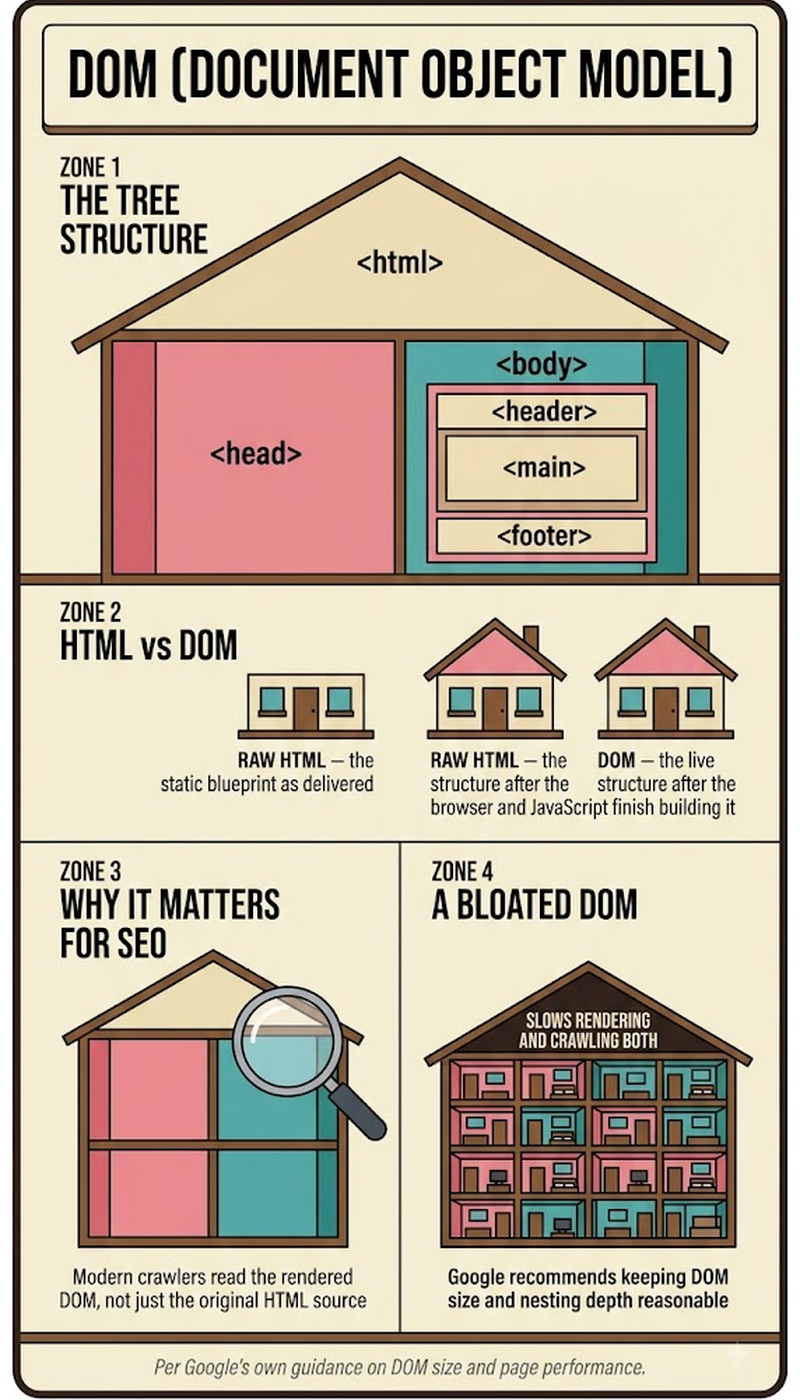
The DOM — Document Object Model — is the browser's live, structured representation of a web page, built as a tree of objects that JavaScript can read and modify after a page's HTML has loaded. It's not the HTML file itself; it's what the browser constructs from that HTML, turning static markup into an interactive structure where every element, attribute, and piece of text becomes an addressable object. This distinction matters more than it might seem: a page's raw HTML source and its live DOM can genuinely differ, especially once JavaScript has run and modified elements dynamically after the initial page load.
Key Takeaways
- The DOM is the browser's constructed, in-memory tree representation of a page — built from HTML but not identical to it, and capable of changing after the initial page load through JavaScript.
- DOM manipulation (adding, removing, or modifying elements via JavaScript) is how dynamic, interactive web behavior works — every button click that changes what's on screen without a full page reload is DOM manipulation in action.
- What a search engine crawler sees in a page's raw HTML source and what actually exists in the fully-rendered DOM can differ significantly on JavaScript-heavy sites, which is directly relevant to technical SEO.
- The "virtual DOM," used by frameworks like React, is a separate, lightweight in-memory representation frameworks use to calculate efficient updates before touching the real, browser-rendered DOM.
- Google's crawlers evaluate the rendered DOM, not just the raw HTML source, when assessing a page's content — meaning content only present after JavaScript execution can still be seen, provided rendering completes successfully.
How Is the DOM Actually Different From a Page's Raw HTML?
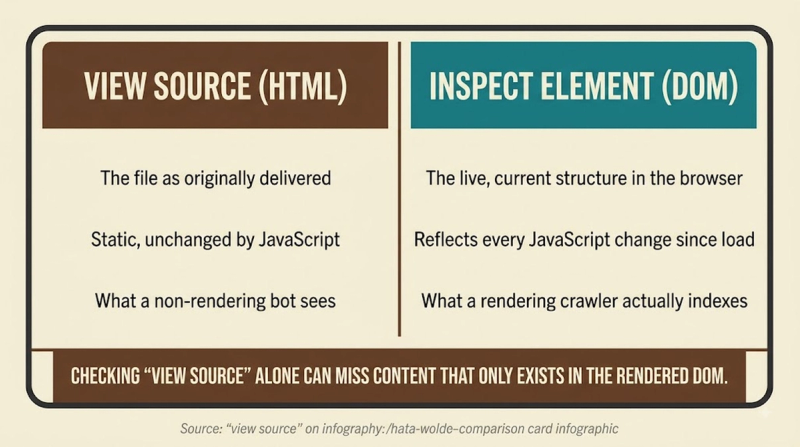
A page's raw HTML is the static text file a server sends to the browser, while the DOM is the structured, object-based tree the browser builds from that HTML after parsing it — and once JavaScript starts running, the DOM can diverge substantially from the original HTML as elements get added, removed, or modified dynamically. Viewing a page's "source" in a browser typically shows the original, unmodified HTML as it was received from the server; inspecting the DOM through browser developer tools shows the current, live structure, which may include entirely new elements JavaScript injected after the page finished loading. This distinction is exactly why "view source" can look nothing like what a visitor actually sees on a JavaScript-heavy page — the visible content exists in the DOM, not necessarily in the original HTML source.
Comparing the two:
- What it is — Raw HTML: static text file from the server. DOM: live, structured tree built by the browser.
- Changes after load? — Raw HTML: no, stays as originally received. DOM: yes, JavaScript can modify it continuously.
- Viewed via — Raw HTML: "View Page Source" in a browser. DOM: browser DevTools "Elements" or "Inspector" panel.
- What crawlers historically saw — Raw HTML: just this, in early web crawling. DOM: modern crawlers evaluate the rendered DOM.
Why Does the DOM Actually Matter for Technical SEO?
Search engines need to evaluate the rendered DOM — not just the raw HTML — to see content and links that only exist after JavaScript execution, which means a mismatch between what's in the initial HTML and what actually populates the DOM is a direct, practical technical SEO concern rather than a purely academic distinction. Google's crawlers do render JavaScript and evaluate the resulting DOM, but this happens in a separate, resource-intensive rendering stage that can introduce meaningful delay compared to content already present in the initial HTML response. A page relying heavily on client-side JavaScript to build its DOM after load is exposed to exactly the indexing-delay risk this site's client-side rendering and render budget pages cover in more depth — the DOM is the underlying mechanism those broader concepts are actually about.
What Is DOM Manipulation, and How Does It Actually Work?
DOM manipulation is the process of using JavaScript to add, remove, or modify elements, attributes, and content within the DOM after a page has loaded — it's the fundamental mechanism behind essentially all dynamic, interactive web behavior, from a button click that reveals hidden content to a form that validates input without reloading the page. Common DOM manipulation methods include creating new elements, changing existing element attributes or text content, and adding or removing elements from the tree structure entirely. Every modern JavaScript framework — React, Vue, Angular — ultimately performs DOM manipulation under the hood, even though most of them add an abstraction layer (like the virtual DOM) specifically to make that manipulation more efficient than manipulating the real DOM directly and repeatedly.
What's the Actual Difference Between the DOM and the Virtual DOM?
The virtual DOM is a lightweight, in-memory JavaScript representation of the DOM that frameworks like React use to calculate the most efficient set of actual changes needed before touching the real, browser-rendered DOM directly — it exists specifically to solve a performance problem, since direct, repeated manipulation of the real DOM is computationally expensive. When application state changes, a framework using a virtual DOM builds a new virtual representation, compares it against the previous version (a process often called "diffing"), and then applies only the specific, minimal changes needed to the real DOM — rather than rebuilding the entire visible structure from scratch on every update. This distinction is purely an internal optimization technique; from a search engine's perspective, what ultimately matters is the real, rendered DOM the virtual DOM eventually produces, not the intermediate virtual representation itself.
DOM structure and manipulation are the foundational mechanisms underneath client-side rendering as a broader architecture pattern, and understanding how the DOM gets built explains exactly why JavaScript SEO exists as its own technical SEO discipline in the first place.
PERSONAL INSIGHT — PENDING: Shwetank to provide a real detail here (Pyng or HCL context only) before this placeholder is filled. Do not invent an anecdote.
Frequently Asked Questions
Is the DOM specific to JavaScript, or can other languages interact with it too?
The DOM is a language-independent specification (maintained by the W3C and WHATWG), though JavaScript is by far the most common language used to interact with and manipulate it in a browser context.
Does every webpage have a DOM, even simple static HTML pages?
Yes — every page rendered in a browser has a DOM constructed from its HTML, regardless of whether that page uses any JavaScript at all; the DOM is simply the browser's structural representation of the page.
Can excessive DOM manipulation actually slow down a website?
Yes — frequent, inefficient direct DOM manipulation is a well-documented performance bottleneck, which is exactly the problem frameworks using a virtual DOM or similar optimization techniques are designed to address.
Does the size of the DOM (number of elements) affect page performance?
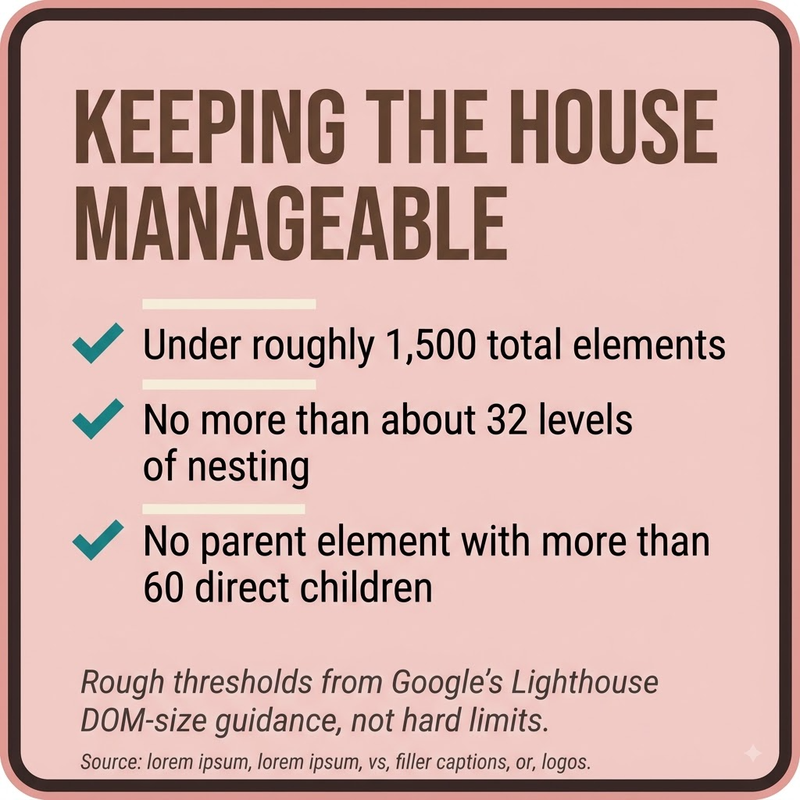
Yes — an excessively large DOM tree (many thousands of nested elements) can slow down rendering, style calculations, and JavaScript operations that need to traverse or search through the tree.
How can you actually inspect a page's live DOM rather than its raw HTML source?
Browser developer tools (accessible via right-click "Inspect" in most browsers) show the "Elements" or "Inspector" panel, which displays the current, live DOM structure rather than the original static HTML source.
Does Google's crawler wait indefinitely for JavaScript to finish modifying the DOM before evaluating a page?
No — Google's rendering process has practical time and resource constraints, meaning JavaScript that takes unusually long to finish modifying the DOM risks not being fully captured before evaluation happens.
Is the Shadow DOM the same thing as the regular DOM?
No — the Shadow DOM is a separate, encapsulated DOM subtree used primarily for web components, designed to keep a component's internal structure and styling isolated from the main page's DOM.
Can DOM manipulation be used to insert content specifically to manipulate search rankings?
Using JavaScript to insert genuinely different content for crawlers than what real users see would constitute cloaking, which violates search engine guidelines regardless of the specific technical method used to achieve it.
Does the DOM include CSS styling information, or only HTML structure?
The DOM primarily represents HTML structure, while the CSSOM (CSS Object Model) is a separate but related tree representing styling information — browsers combine both into a render tree to actually display a page visually.
Is understanding the DOM necessary for basic SEO work, or only for technical SEO specialists?
Basic on-page and content SEO work doesn't require deep DOM knowledge, but technical SEO work involving JavaScript-heavy sites benefits significantly from understanding how the DOM is built and evaluated by search engines.


