
Core Web Vitals are Google's three official metrics for measuring real-world page experience: Largest Contentful Paint (LCP) for loading speed, Interaction to Next Paint (INP) for responsiveness, and Cumulative Layout Shift (CLS) for visual stability. Google measures all three from real user data rather than lab simulations, and uses them as a confirmed ranking signal inside its broader page experience evaluation. One correction worth making up front: INP replaced First Input Delay as the official responsiveness metric back in March 2024. A fair amount of SEO content floating around still hasn't caught up with that change, and citing FID today is a quiet signal the source is out of date.
Key Takeaways
- The current three Core Web Vitals are LCP (loading), INP (responsiveness), and CLS (visual stability) — FID was fully retired as an official Core Web Vital in March 2024.
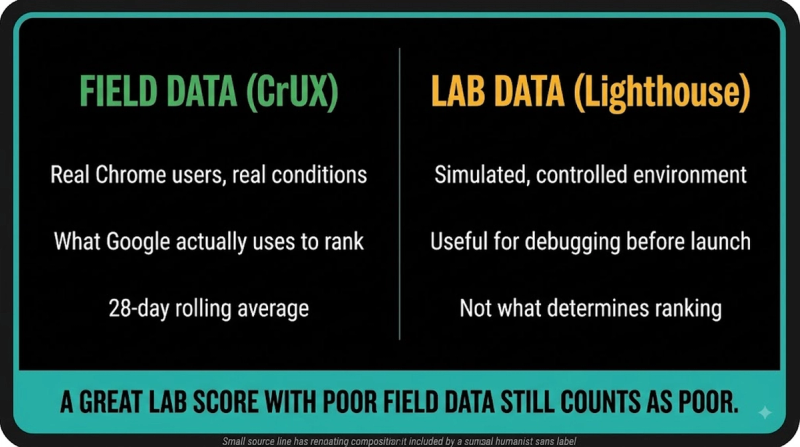
- Core Web Vitals are measured from real-world user data (field data via the Chrome User Experience Report), not just lab-simulated tests, which is why two sites can score differently in Lighthouse versus their actual Search Console Core Web Vitals report.
- Each metric has three thresholds — good, needs improvement, poor — and Google's page experience signal is based on the 75th percentile of real user experiences, not the average.
- Core Web Vitals are a confirmed ranking factor, but a comparatively minor one relative to content relevance and quality — a fast page with weak content still won't outrank a slower page with substantively better content.
- This site covers each individual metric in its own dedicated page; this page focuses on how the three work together as a package and what changed with the INP transition.
Largest Contentful Paint, Interaction to Next Paint, and Cumulative Layout Shift each cover their specific metric's diagnostics and fixes in depth — this page is the umbrella overview connecting all three. Core Web Vitals problems on JavaScript-heavy sites often trace back to rendering architecture choices covered in JavaScript SEO.
How Are the Three Core Web Vitals Actually Measured?
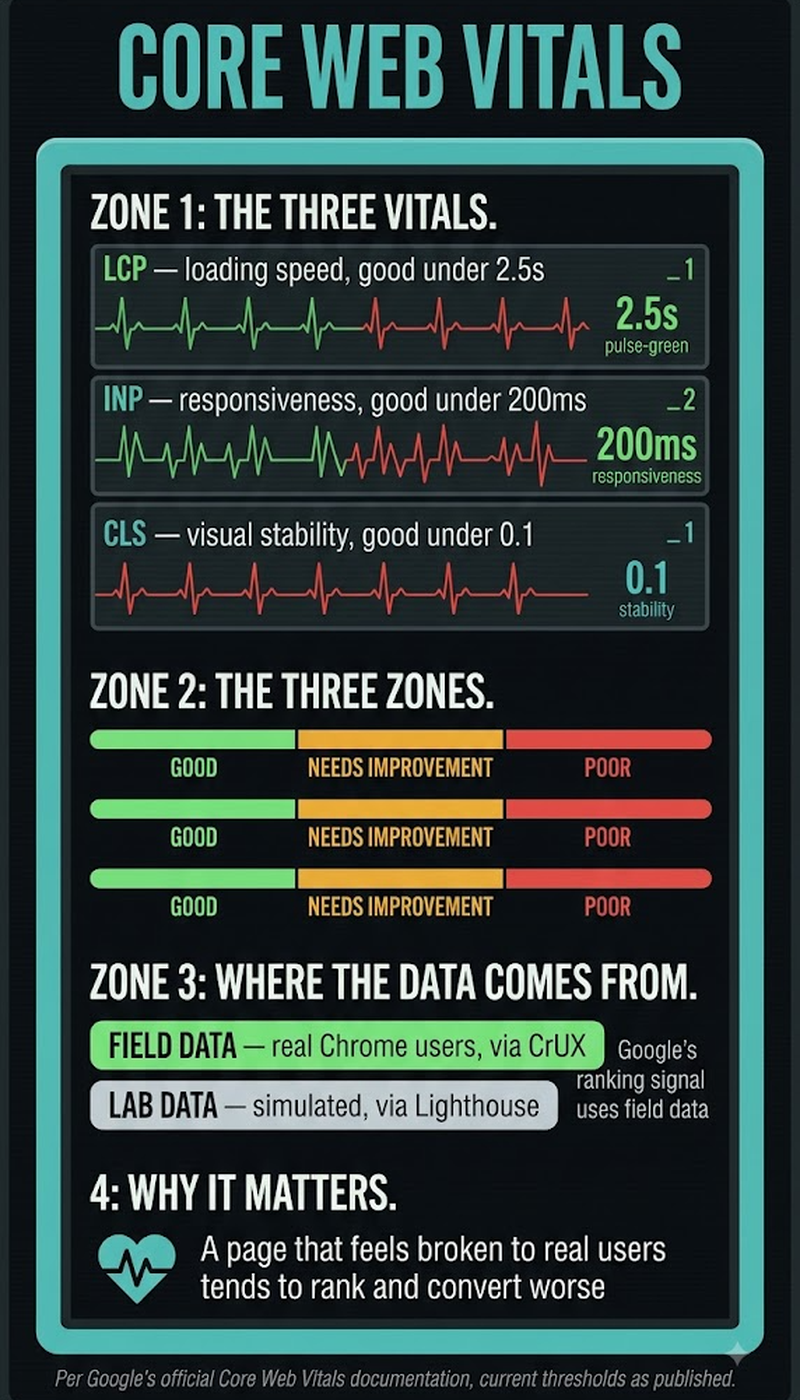
Each Core Web Vital is measured differently, matching the specific aspect of page experience it tracks, and Google reports all three primarily from real-world field data collected through the Chrome User Experience Report (CrUX) rather than synthetic lab tests alone.
The three metrics at a glance:
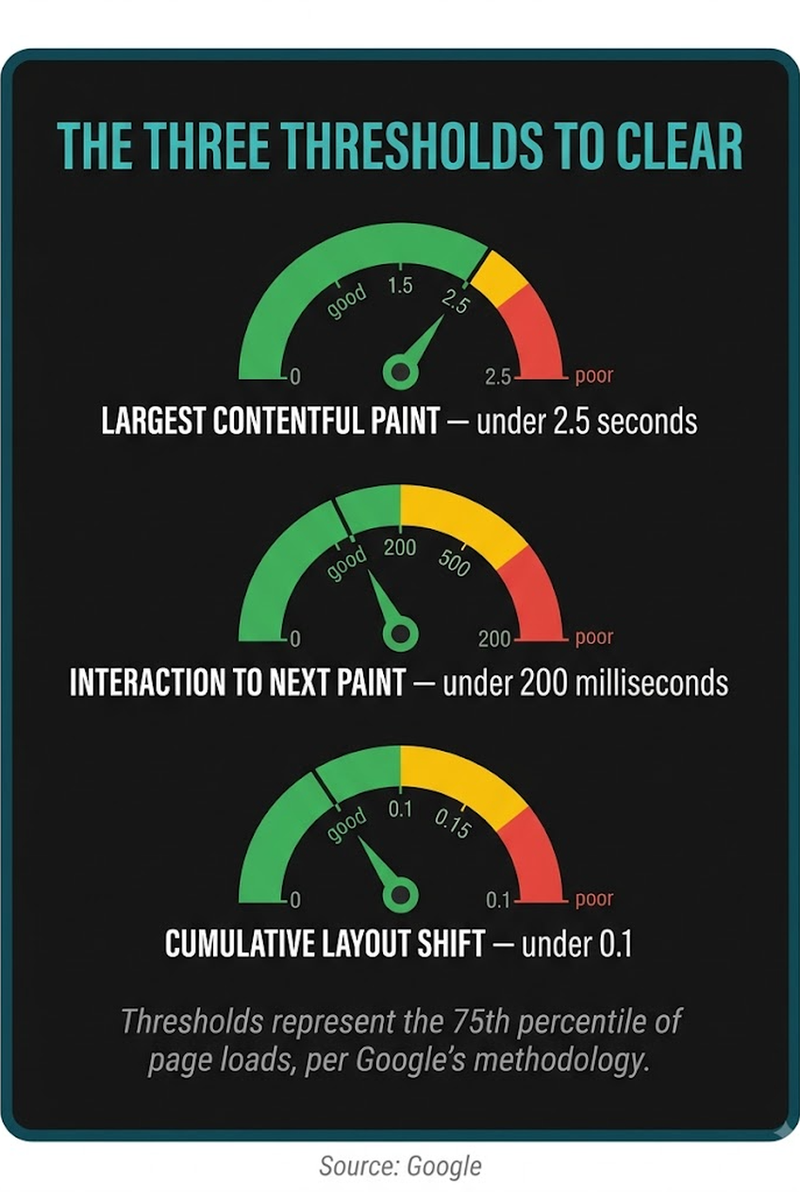
- LCP (Largest Contentful Paint) — measures time until the largest visible element loads. Good threshold: ≤2.5 seconds. Data source: field + lab.
- INP (Interaction to Next Paint) — measures responsiveness across all page interactions. Good threshold: ≤200 milliseconds. Data source: field only.
- CLS (Cumulative Layout Shift) — measures unexpected visual movement during load. Good threshold: ≤0.1. Data source: field + lab.
Because INP requires actual user interaction data to measure, it can only be assessed through field data — it can't be simulated in a lab test the way LCP and CLS can, which is one reason INP is harder to diagnose and fix proactively before a site has real traffic generating the signal.
Why Did INP Replace First Input Delay in 2024?
FID only measured the delay before a browser began processing a user's first interaction. INP measures the full responsiveness of every interaction across the entire visit — a much more complete picture of how a page actually feels to use. FID's narrow focus let a page score well while still feeling sluggish by the second or third click. A stuttering scroll menu, a form that lags after the first tap — none of it showed up in FID, because FID only ever looked at that one opening interaction. Google made the switch official in March 2024, after running INP alongside FID as an experimental metric for over a year to give developers time to adjust before FID was fully retired.
Are Core Web Vitals Actually a Ranking Factor?
Yes, but don't overweight it. Google has confirmed page experience, Core Web Vitals included, as a ranking signal since the metrics launched — it's just one signal among many, and it carries meaningfully less weight than content relevance and quality. Google's own guidance keeps repeating the same point: a technically fast page with thin or irrelevant content won't outrank a slower page that actually answers the query better. Core Web Vitals work more as a tiebreaker between pages of comparable content quality than as a lever that moves rankings on its own. Fix them anyway, though — poor scores correlate with higher bounce rates and weaker engagement regardless of what happens in the rankings, and that alone justifies the work.
How Do You Check a Site's Current Core Web Vitals Scores?
Checking Core Web Vitals requires looking at both field data (how real visitors actually experienced the page) and lab data (a controlled test simulating page load), since they can tell different stories:
- Open Google Search Console's Core Web Vitals report for the site-wide, real-user field data view, grouped by URL group and showing pass/fail status against Google's thresholds.
- Run PageSpeed Insights on individual URLs for both a field data summary (if enough real traffic exists for that URL) and a lab-based Lighthouse score breaking down what's driving each metric.
- For INP specifically, since it requires field data, check Search Console or the CrUX dashboard directly — Lighthouse lab tests can't produce a real INP score, only a related lab proxy metric.
- Cross-reference low-traffic pages that don't have enough CrUX data against origin-level (whole-domain) field data, which Google uses as a fallback signal for pages without individual page-level data.
- Re-test after any fix, since layout shifts and interaction delays are often caused by specific elements (ads, web fonts, third-party scripts) that need isolated verification rather than a single site-wide fix.
What Actually Causes Poor Core Web Vitals Scores Most Often?
Third-party scripts, unoptimized images, web fonts causing layout shift, and render-blocking JavaScript are the most common root causes across all three metrics, though each metric tends to have its own dominant culprit. Large, unoptimized hero images or slow server response times typically drive poor LCP scores. Heavy JavaScript execution — often from third-party analytics, chat widgets, or ad scripts competing for the main thread — is the most common INP culprit, since it delays the browser's ability to respond to user interactions. CLS problems usually trace back to images or ads loading without reserved space, or web fonts swapping in and shifting text after initial render.
Frequently Asked Questions
Do Core Web Vitals apply equally to mobile and desktop, or are they scored separately?
Google reports Core Web Vitals separately for mobile and desktop, since real-world performance and thresholds can differ meaningfully between device types and network conditions.
Does a site need to pass all three Core Web Vitals to get a ranking benefit, or does partial improvement help?
There's no strict all-or-nothing threshold — improvement on any single metric that was previously in the "poor" range can help, though passing all three at "good" is the target Google's own guidance describes.
How much real-user traffic does a page need before Google can generate field data for it?
Google requires a minimum, undisclosed volume of real Chrome user visits over a 28-day rolling window before a URL has enough CrUX data to report; low-traffic pages often show no data and fall back to origin-level aggregates instead.
Can a single-page application (SPA) get accurate Core Web Vitals scores, or does client-side routing distort the numbers?
SPAs can get accurate Core Web Vitals scores, but soft navigations (in-app route changes without a full page reload) required updated measurement handling that Google has been refining specifically because standard metrics were originally built around full page loads.
Does using a CDN automatically improve Core Web Vitals scores?
A CDN can improve LCP by reducing server response time, but it doesn't directly address INP or CLS issues, which are typically caused by client-side script execution and layout behavior rather than network latency.
Are Core Web Vitals thresholds the same for every type of website, or do they vary by industry?
The thresholds are the same universal numbers across all sites and industries; Google doesn't publish industry-adjusted benchmarks, though real-world median scores do vary noticeably by site type and content complexity.
Does Google penalize a site for poor Core Web Vitals, or just rank it lower among similar-quality competitors?
It's framed as the latter — Google has described Core Web Vitals as a differentiating signal among pages of similar relevance and quality, not a blanket penalty applied independently of content.
Can ads on a page hurt Core Web Vitals scores even if the ad network is reputable?
Yes — ad scripts are a common driver of both CLS (unreserved space causing shift when ads load) and INP (heavy JavaScript execution competing for the main thread), regardless of the ad network's overall reputation.
Do Core Web Vitals scores update in real time, or is there a reporting delay?
Field data in Search Console and CrUX is based on a rolling 28-day window, so there's an inherent lag — a fix made today won't be reflected in the reported score until enough new user data accumulates.
Is there a difference between "Core Web Vitals" and the broader "page experience" signals Google evaluates?
Yes — Core Web Vitals are one component of Google's broader page experience evaluation, which has also included factors like mobile-friendliness and the absence of intrusive interstitials at different points in its documented history.
Can a site with excellent Core Web Vitals still rank poorly for other technical reasons?
Yes — strong Core Web Vitals scores don't offset separate technical problems like poor indexing, thin content, or crawlability issues, since these are evaluated as distinct signals rather than one composite score.


