
TL;DR. Robots.txt is a plain text file sitting at a site's root, asking crawlers which URLs to request through user-agent, allow, and disallow rules, a request rather than an enforced barrier. Blocking AI crawlers wholesale carries a measured cost: a Rutgers and Wharton study found publishers who did it lost 23.1 percent of total monthly traffic.
What is robots.txt?
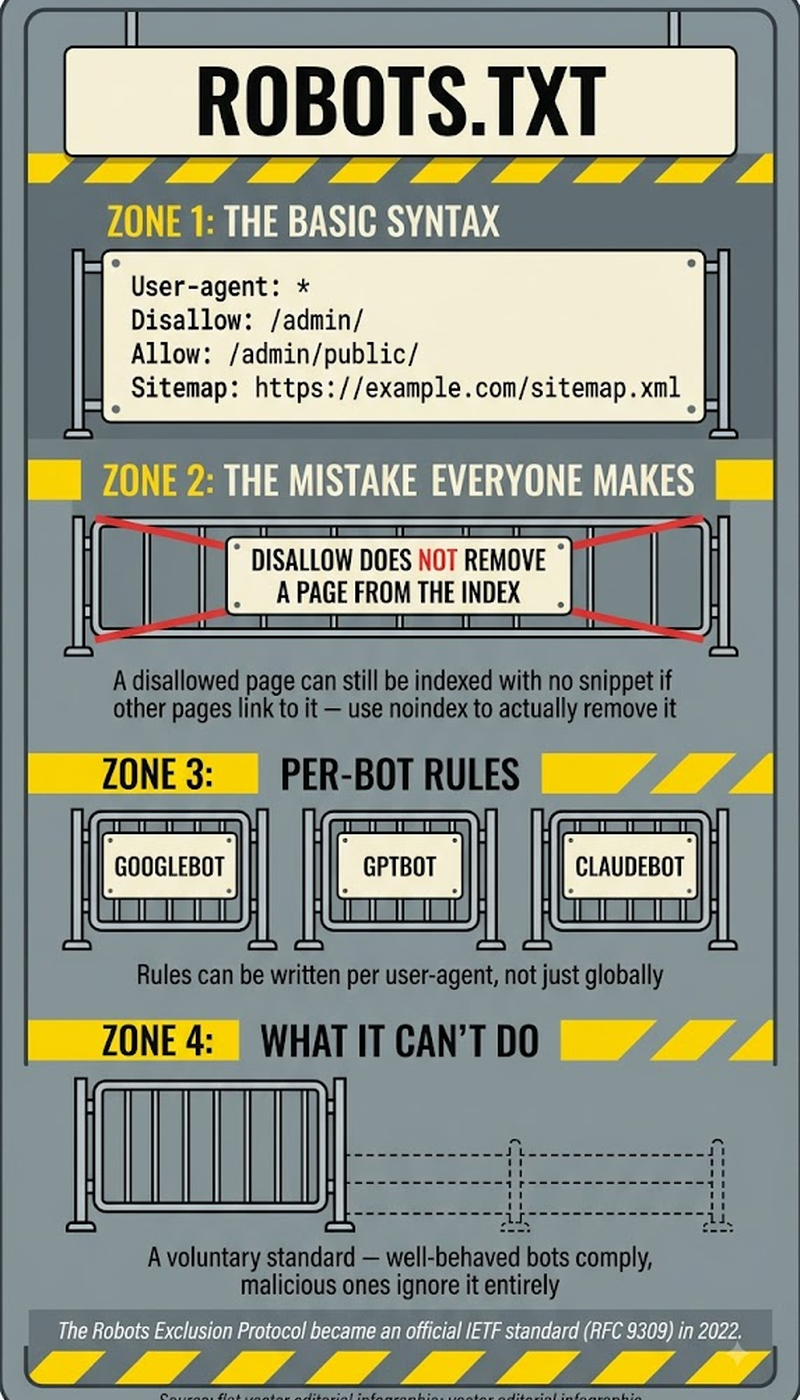
Robots.txt sits at a predictable address, example.com/robots.txt, and tells crawlers which parts of the site they may or may not touch. Well behaved crawlers honor it. Badly behaved ones read it and ignore it, since nothing about the file actually enforces compliance.
Robots.txt is usually the first thing a crawler checks before requesting anything else, which is exactly why one misplaced line can quietly hide an entire domain from search or AI visibility overnight.
Key highlights
- A December 2025 Rutgers and Wharton study found publishers blocking AI crawlers via robots.txt lost 23.1 percent of total monthly traffic, and 13.9 percent of traffic from human visitors alone.
- Blocking by reputable sites climbed fast: 23 percent had disallowed AI crawlers in September 2023, and by May 2025 that number was pushing 60 percent.
- GPTBot draws the most disallow rules of any AI crawler, showing up in about 5.5 percent of them, ahead of CCBot, ClaudeBot, and Google-Extended.
- Over 2.5 million sites had fully shut out AI training crawlers as of August 2025, and more than a million domains lean on Cloudflare's single click AI-blocking toggle to do it.
How robots.txt works
Four fields do the actual work. User-agent names the crawler a rule applies to, disallow blocks paths from it, allow carves out exceptions, and sitemap points crawlers toward the XML sitemap.
A basic setup keeps a staging folder off limits to every crawler while still pointing to the sitemap:
User-agent: *
Disallow: /staging/
Sitemap: https://example.com/sitemap.xml
Robots.txt vs noindex
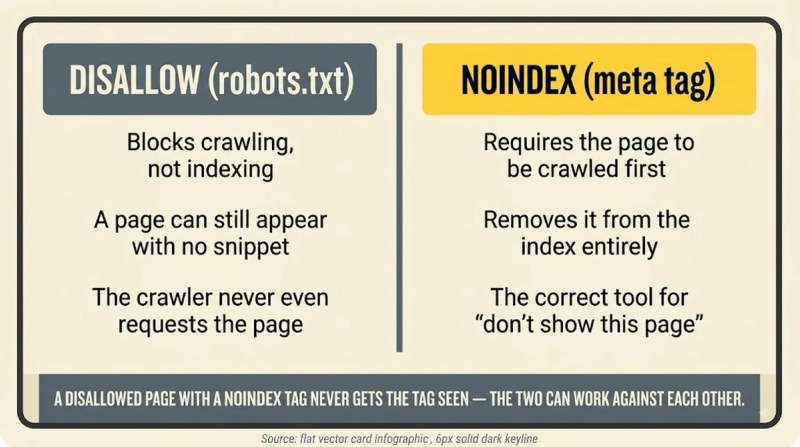
Crawling and indexing are not the same problem, and robots.txt only solves one of them. Blocking a page with disallow stops crawling, but Google can still list that URL in results, without a snippet, if other pages link to it, since it never got close enough to see a noindex instruction.
Noindex is the reliable tool for keeping a page out of results entirely. Disallowing it in robots.txt actually works against that goal by preventing Google from ever reading the noindex tag.
Robots.txt and AI crawlers
Most sites get this part wrong. GPTBot, ClaudeBot, PerplexityBot, and Google-Extended all respect robots.txt, so a blanket block, often a leftover reflex from the block everything panic of 2023 and 2024, cuts off legitimate AI referral traffic without touching the crawlers that ignore the file regardless.
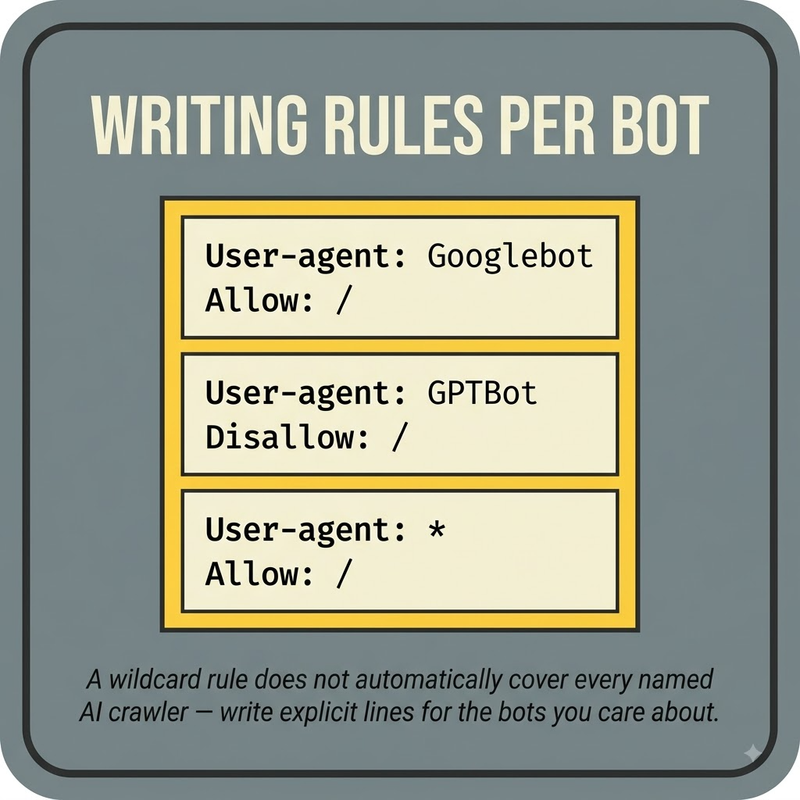
A more selective default separates search facing AI bot user agents that drive citations and referral traffic from pure training crawlers, which are a more reasonable target for restriction.
One example allows a search facing crawler through while blocking a training only one:
User-agent: PerplexityBot
Allow: /

User-agent: GPTBot
Disallow: /
How to create and test robots.txt
- Create a plain text file named robots.txt and place it at the domain root.
- List user-agent groups with the specific disallow and allow paths each one needs.
- Add a sitemap directive pointing at the XML sitemap.
- Test it in Google Search Console's robots.txt report before it goes live.
- Recheck it after every major redesign, since an accidental full-site block is one of the most common launch day mistakes.
Frequently asked questions
Does robots.txt actually stop anyone from accessing a page?
Not reliably. It works only on crawlers that choose to respect it, which covers the major search and reputable AI bots but nothing malicious. Treat it as a request honored by good actors, not a security boundary or access control mechanism.
Should I block AI crawlers like GPTBot?
Blanket blocking is the wrong default for most sites. The Rutgers and Wharton study tying AI blocks to a 23.1 percent traffic decline suggests picking crawlers selectively, keeping search facing bots like PerplexityBot allowed while restricting pure training crawlers, beats an all or nothing rule.
What's the actual difference between robots.txt and noindex?
Robots.txt controls crawling. Noindex controls whether a page can appear in results at all. A page blocked from crawling can still surface in search without a description if it's linked from elsewhere, which is why noindex, not disallow, is the reliable choice for keeping something out of results.
What happens if a staging block ships to production by accident?
The entire site disappears from crawling until someone catches it, which is one of the most common and most damaging robots.txt mistakes. Reviewing the file immediately after every deploy or redesign is the simplest safeguard.
Are all AI crawlers blocked equally often?
No. GPTBot draws the most disallow rules of any AI crawler, appearing in roughly 5.5 percent of them, ahead of CCBot, ClaudeBot, and Google-Extended, which suggests site owners are targeting specific bots rather than applying identical rules everywhere.
Where should the sitemap directive live?
Inside the robots.txt file itself, using a Sitemap colon line pointing at the XML sitemap's full URL. Placing it there lets any crawler, not just ones with Search Console access, discover the sitemap immediately upon reading the file.


